Please visit the Google Home & Nest Community to connect with other users, ask questions, and explore the new space.
- Google Nest Community
- Home Automation
- Re: Restricting access to Google home devices
- Subscribe to RSS Feed
- Mark Topic as New
- Mark Topic as Read
- Float this Topic for Current User
- Bookmark
- Subscribe
- Mute
- Printer Friendly Page
Restricting access to Google home devices

- Mark as New
- Bookmark
- Subscribe
- Mute
- Subscribe to RSS Feed
- Permalink
08-20-2023 02:53 PM
I came across the following post and wanted to share one solution but couldn't reply to the poster as the issue was closed with no resolution.
The issue was posted as this:
Hi,
I Have a house with multiple smart devices in different rooms and at the moment everyone can change everything. I could remove them from the house but then they would not be able to use the devices that I do want them to have access to. This means people being able to turn on and off lights or switches from different rooms or even guests being able to turn switches on which I would not want them to turn on (for instance a smart switch that opens a lock). Ideally, I would like to control whether the devices can be triggered by guests or not (based on voice match) and also to restrict the use of some devices to some of the house members.
It seems such a simple solution being able to control what devices can each member use or to have a function that lets you decide to not let unrecognized voices use certain devices (especially since there is voice match)
Work around is as follows:
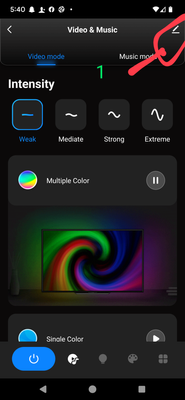
Most devices can be shared of they are 3rd party devices (I.E. Yale Locks, ULock, An big one Tuya or Smart Life based devices, etc.) It can be a little cumbersome if you have guests staying with you all the time but here is how to do it at least in Smart Life. You will have to share each individual device (this is the cumbersome part). In Smart Life for example.
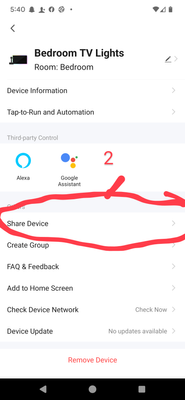
1. Go into the individual device and tap on the pencil icon next to the devices name.
2. Tap Share Device the first option in the bottom field.
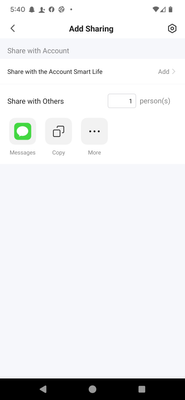
3. Choose your method for sharing and that's it. If you have multiple devices you want to share I would recommend having the person setup a separate account for Smart Life or Tuya if your sharing in that app. This way they have access to the devices in one location vs. Rash individual link.
The downside is that you still really can't limit there control when saying "Hey Google" that will have the same access as someone in the house not known. But they can activate the Tuya or Smart Life voice assistant and activate it turning in with a recognition command on their phone and if they have it nearby it it will recognize and activate. 🤷♂️ Not the ideal solution but it's a solution better than we don't help or support your need for guests....GOOGLE not the company that fought the government over the Patriot Act and Americans privacy right to searches anymore are you....
- Labels:
-
Android
-
Apps Account
-
Sharing an Automation


- Mark as New
- Bookmark
- Subscribe
- Mute
- Subscribe to RSS Feed
- Permalink
08-23-2023 05:17 AM
Hi Joutcast78,
We appreciate you sharing your resolution here in the Community! If there is anything else we can help you with Google Home, let us know. We’ll be more than happy to assist you.
Regards,
Alex

- Mark as New
- Bookmark
- Subscribe
- Mute
- Subscribe to RSS Feed
- Permalink
2 weeks ago
I stedet for å fokusere kun på selve spillet, begynte jeg å vurdere hvordan informasjon om casino i Norge faktisk blir formidlet. Det er stor forskjell på hvordan ulike sider strukturerer innholdet sitt. Da jeg kom over book of dead slot, virket det som om informasjonen var mer gjennomtenkt organisert. Det gjorde det lettere å få oversikt uten å måtte lese samme ting flere ganger. Book of Dead er et klassisk spill med 5 hjul og 10 gevinstlinjer , og i Norge gir en tydelig presentasjon bedre grunnlag for å forstå hvordan slike spill fungerer i praksis.





