Please visit the Google Home & Nest Community to connect with other users, ask questions, and explore the new space.
- Google Nest Community
- Streaming
- Searching for accessories
- Subscribe to RSS Feed
- Mark Topic as New
- Mark Topic as Read
- Float this Topic for Current User
- Bookmark
- Subscribe
- Mute
- Printer Friendly Page
Searching for accessories

- Mark as New
- Bookmark
- Subscribe
- Mute
- Subscribe to RSS Feed
- Permalink
09-04-2023 01:43 PM
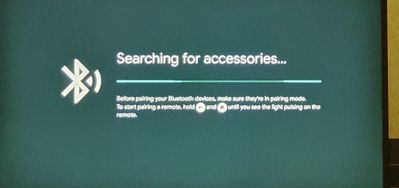
The following images is continues to appear by it self. it's so disturbing and i could not find a solution for it.
My device is now and the problem started from the beginning of using the device.


- Mark as New
- Bookmark
- Subscribe
- Mute
- Subscribe to RSS Feed
- Permalink
09-07-2023 03:01 PM
Hi Abdullah_,
Thanks for posting here in the Google Nest Community. You mentioned that this has been happening from the very beginning; did you have a chance to successfully set it up first? If you did, then something is triggering the pairing button to do this. It’s the only button that you can find on the actual Chromecast device. If it’s pressed (without holding it down), it then triggers this for a few minutes. The fact that it happens continuously means the button is successively being pressed. Kindly check if there’s something that’s physically triggering this by checking the button itself or anything around it. If not, try to unplug it for a minute. If it persists after rebooting, try a factory reset for a full clean-up, then set it up from scratch. Let us know how it goes.
Thanks,
Kimy
- Mark as New
- Bookmark
- Subscribe
- Mute
- Subscribe to RSS Feed
- Permalink
09-15-2023 03:03 PM
I tried several solutions of what you suggested and it did not work.
But I do believe that the problem comes from "Special app access" i disabled all unnecessary features special the "Allow display over other apps" once I disable all apps the paring stopped showing up, so far.
- Mark as New
- Bookmark
- Subscribe
- Mute
- Subscribe to RSS Feed
- Permalink
09-17-2023 06:28 PM
Hello Abdullah_,
Thanks for keeping us in the loop. I’m glad you found a workaround. Since that’s how you fixed it, a proper factory reset would have helped. It would set it all to default, and the only time changes are applied is when certain apps start asking for access or permissions. Now that you have it working, do you have other questions or concerns? We look forward to your response.
Cheers,
Kimy





