- Google Nest Community
- Cameras and Doorbells
- No settings changed, nest doorbell battery no long...
- Subscribe to RSS Feed
- Mark Topic as New
- Mark Topic as Read
- Float this Topic for Current User
- Bookmark
- Subscribe
- Mute
- Printer Friendly Page

- Mark as New
- Bookmark
- Subscribe
- Mute
- Subscribe to RSS Feed
- Permalink
- Report Inappropriate Content
12-14-2023 07:16 AM
Hello!
I'm very frustrated with what is happening to my nest doorbell (newest battery version).
After the initial setup I haven't altered any Wi-Fi settings but now it doesn't work anymore. If I start the initial setup after resetting the doorbell I don't even see my Wi-Fi network. Although it worked initially and I haven't changed any settings in the previous two months.
I'm running an ASUS XD4 router in WiFi 6, ax mode, WPA 2/ WPA 3 personal. My router settings are attached below. I no longer am able to connect my doorbell to this network. Nest hub 2 works fine as well as all legacy devices I have.
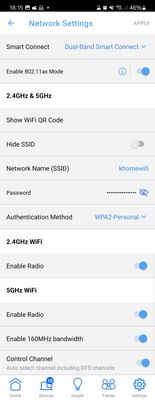
Answered! Go to the Recommended Answer.
- Mark as New
- Bookmark
- Subscribe
- Mute
- Subscribe to RSS Feed
- Permalink
- Report Inappropriate Content
01-20-2024 08:22 AM
Somehow, setting "power save mode" on my router, increasing hang time on one frequency to 20 minutes, decreasing transmission power and disabling extended channel selection, helped. In 2 weeks, 100% of the time the doorebell worked from the app. As as side benefit - projected battery time changed from 2 months to 10 months. 🤷
I think this issue is solved. A bit of a shame, that the doorbell did not work until i changed that.


- Mark as New
- Bookmark
- Subscribe
- Mute
- Subscribe to RSS Feed
- Permalink
- Report Inappropriate Content
12-14-2023 03:51 PM - edited 12-15-2023 10:34 AM
Hello, I'm and end user like you and I'm not sure what is going on here. I'm going to try and escalate this and get some help on this one. Once it is working again please return here and let us know how it got fixed.


- Mark as New
- Bookmark
- Subscribe
- Mute
- Subscribe to RSS Feed
- Permalink
- Report Inappropriate Content
12-15-2023 06:46 AM
Hello folks,
@Ksetdekov, thanks for reaching out here in the Community. To know more about this issue, I’d like to confirm, what is the light status of it? How did you perform the factory reset?
To know more about the reset, you may visit our public article about "Restart or factory reset Nest camera or doorbell".
Looking forward to your response.
I appreciate your response, EmptyNester.
Regards,
Emerson
- Mark as New
- Bookmark
- Subscribe
- Mute
- Subscribe to RSS Feed
- Permalink
- Report Inappropriate Content
12-17-2023 06:29 AM
Yeah, the issue persists. I was unable to connect this doorbell in 2 houses with the same wifi routers. I am able to connect it to an older router, but only in 2.4 network (1 channel, router - WNDR3800, netgear). It works during setup, sometimes later, but I cannot consistenly connect to my camera.
Is there a text description of what are the exact standards that the wifi network must be to match what is required for nest doorbell? Can it even in theory work in Russia?
- Mark as New
- Bookmark
- Subscribe
- Mute
- Subscribe to RSS Feed
- Permalink
- Report Inappropriate Content
12-19-2023 02:30 PM - edited 12-20-2023 06:11 AM
Hi Ksetdekov,
@Ksetdekov, we appreciate your update. You may try creating a separate 2.4GHz bandwidth for your Nest Doorbell and make sure your mobile phone is connected to that same Wi-Fi network. You may also try enabling 802.11 b/g/n if you have an 802.11 ac router. Set your Wi-Fi router's DHCP lease time to at least two hours.
To learn more, you may visit our public article about "Recommended Wi-Fi network and router settings".
Let us know how it goes.
Best,
Emerson
- Mark as New
- Bookmark
- Subscribe
- Mute
- Subscribe to RSS Feed
- Permalink
- Report Inappropriate Content
12-20-2023 12:57 AM
Hi! Thanks for the update. Unfortunately the last part of a solution is a no-go for me, it's 2023 and using anything below WiFi 6 is not accepting.
I will try playing with DHCP lease settings.
Can you please provide a link to the "Recommended Wi-Fi network and router settings" article? I'm not able to find it (
- Mark as New
- Bookmark
- Subscribe
- Mute
- Subscribe to RSS Feed
- Permalink
- Report Inappropriate Content
12-20-2023 02:36 PM
Hey Ksetdekov,
Sure thing. Just tap the link I've provided above and keep us posted with your update.
Thanks,
Emerson
- Mark as New
- Bookmark
- Subscribe
- Mute
- Subscribe to RSS Feed
- Permalink
- Report Inappropriate Content
12-24-2023 10:33 AM
Hi!
Still having no luck. Although this time my nest doorbell was able to connect to my Wi-Fi 6 router. DHCP lease time is set to 6 days right now.
My current device information is like this:
Device information
:
Name
Front door doorbell
Home
Квартира
Room
Front door
Spoken language
English (UK)
Open Source Licenses
Technical information
Model: Nest Doorbell (battery)
Device ID: 7FB750A084D9334B
Serial no.: 1B151GZD60KEYS
Software version: gq-user 1.69 OPENMASTER 388143
release-keys stable-channel stable-channel
IP: 192.168.50.76
I get a notification sometimes, but am unable to view live video form the doorbell even right after ringing it
- Mark as New
- Bookmark
- Subscribe
- Mute
- Subscribe to RSS Feed
- Permalink
- Report Inappropriate Content
12-29-2023 03:01 PM
Hello Ksetdekov,
Thanks for updating us with your concern. We'd be happy to take a look into this for you. Please fill out our Contact us form with all the needed information. Let me know once you’re done.
Regards,
Emerson

- Mark as New
- Bookmark
- Subscribe
- Mute
- Subscribe to RSS Feed
- Permalink
- Report Inappropriate Content
12-31-2023 09:03 PM
Hi there,
We haven't received your form — were you able to fill it out?
Cheers,
Edmond
- Mark as New
- Bookmark
- Subscribe
- Mute
- Subscribe to RSS Feed
- Permalink
- Report Inappropriate Content
01-01-2024 11:52 AM
Edmond, thanks for your reminder! I've submitted my info into the link Emerson provided earlier.
- Mark as New
- Bookmark
- Subscribe
- Mute
- Subscribe to RSS Feed
- Permalink
- Report Inappropriate Content
01-02-2024 01:51 PM
Hello there,
Thank you for taking the time to fill out our form. We have received it and our team will be in touch with you via email to provide further assistance.
Best,
Edmond
- Mark as New
- Bookmark
- Subscribe
- Mute
- Subscribe to RSS Feed
- Permalink
- Report Inappropriate Content
01-20-2024 08:22 AM
Somehow, setting "power save mode" on my router, increasing hang time on one frequency to 20 minutes, decreasing transmission power and disabling extended channel selection, helped. In 2 weeks, 100% of the time the doorebell worked from the app. As as side benefit - projected battery time changed from 2 months to 10 months. 🤷
I think this issue is solved. A bit of a shame, that the doorbell did not work until i changed that.
- Mark as New
- Bookmark
- Subscribe
- Mute
- Subscribe to RSS Feed
- Permalink
- Report Inappropriate Content
01-20-2024 12:50 PM
WOW,,,, what a great break thru on solving this problem. Thank you so much for post this. I had no idea some routers have those settings. "power Save Mode" on a router makes no useful sense to me. They don't draw that much power in the first place.
Glad you have this sorted out.
- Mark as New
- Bookmark
- Subscribe
- Mute
- Subscribe to RSS Feed
- Permalink
- Report Inappropriate Content
01-20-2024 02:20 PM
Hi everyone,
@Ksetdekov, that is awesome! We truly appreciate your update and for sharing here what you've done to resolve it. In case you have additional questions or concerns, you know where to find us.
Thanks for your response, EmptyNester.
Regards,
Emerson





