Gemini for Home voice assistant - Two Week Recap Read more
Turn on suggestions
Auto-suggest helps you quickly narrow down your search results by suggesting possible matches as you type.
Showing results for
Speakers and Displays
- Google Nest Community
- Speakers and Displays
Options
- Mark all as New
- Mark all as Read
- Float this item to the top
- Subscribe
- Bookmark
- Subscribe to RSS Feed
- Threaded format
- Linear Format
- Sort by Topic Start Date
Forum Posts
Share Your Voice! Help Us Improve the Google Community Experience
Hi everyone, We're reaching out from the Google User Experience Research team because your feedback is incredibly important as we work to enhance your community experience! We're currently making improvements to Google’s online Communities to ensure ...

Resolved! Having trouble with Speaker groups? Read this first
Hi everyone, Thank you for continuing to notify us of the reliability issues you’re facing with your Speaker groups. I escalated these issues internally and the team is actively investigating a resolution. If you’re able, all feedback is appreciated!...
Troubleshoot setup: Google Nest or Home speaker or display
Here are some steps I recommend to resolve issues during the setup of Google Nest or Home speakers or displays.Step 1: Things to check on your phone or tablet Turn on Wi-Fi and Bluetooth. Turn off cellular/mobile data.This ensures your phone or table...
Google Home can no longer control linked tv
Every time I tell Google to turn on or off linked Roku tv it tells me it is doing it, message box on tv screen says "thinking", the it says "sorry, timers are not available". Have tried using app on android phone and iPad as well and get same result....
Broadcast to a Speaker Group that has Default Bluetooth Speakers
Hi Everyone,Has anyone got any experience with setting up several Google devices in a home speaker group?I have set up a number of Google speakers into a home speaker group. Within this speaker group, I have a Google mini (Gen-1), that is Bluetooth p...
private routines and household routines
I have added several routines to my smart home. While on vacation my household members cannot find the routine I use for a morning routine. The routine is not visible in their google smart home app. How do I move or copy my personal routines to the g...
google nest stays in recovery mode
On our google nest first we say a grey screen with g logo. After resetting he stays in recovery mode, then you reset and he goes back to recovery mode. The google nest is just two years old. I have tried all the things to reset but the google nest st...
Google Nest Hub display not allowing Home monitoring features to turn on.
Google Nest Hub display not allowing Home monitoring features to turn on. Seems I am not the only one
"Hey Google, play the first one"
I have a google home device with a screen. How can I play a trailer for 'It's a Wonderful Life," using only voice commands (i.e. not walking over to the screen to tap it)?
Can't no longer add a specific Nest Mini to groups, can't even rename it
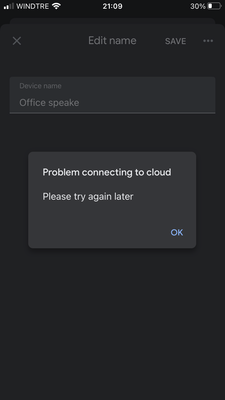
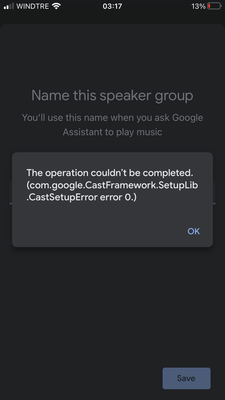
Hi there,I had to change my WIFI network and I'm no longer able to add 1 of my 3 devices to any group (after a looong time the following error appears on iOS: com.google.castframework setuplib castsetup error 0), I can't even rename it (google cloud ...
Can't add Spotify as my default music provider
Hi, I am a Spotify Premium member but ever time I want to play music from my Sonos beam I get the message "Sorry, you don't have a default music provider". All I can select as a default music provider is Youtube. My Sonos app is linked to Spotify tho...
Spotify on mesh speakers - multiple accounts
I have a google home mesh point in our bedroom, and I have a spotify premium account. It's linked to the mesh speaker, and so whenever one of us asks it to play music, it will use that account to play the music. However, occasionally I will be using ...
Sign In to vote
Labels
-
Account Linking
6 -
Android
9,121 -
Automation Help
4 -
Bug
17 -
Casting Issues
3 -
Chromecast (1st Gen)
2 -
Chromecast (2nd Gen)
2 -
Chromecast (3rd Gen)
1 -
Chromecast Audio
1 -
Chromecast with Google TV (4K)
6 -
Cloud Integration
4 -
Connectivity
2,586 -
Connectivity Issues
84 -
Developer Tools
3 -
Discussion
9 -
Display Issues
1,362 -
Feature Request
11 -
Features
4 -
Feedback
563 -
Getting Started
752 -
Google Assistant on Google Nest Device
2,057 -
Google Home (1st Gen)
1,998 -
Google Home app (Android)
1 -
Google Home Max
398 -
Google Home Mini (1st Gen)
1,469 -
Google Nest Device
4,227 -
Google Nest Wifi Pro
1 -
Google Wifi (Gen 1)
12 -
Home App
9 -
Home Automation ***
56 -
Home Away Assist
1 -
Internationalization
2 -
iOS
4,443 -
Issues casting from Chrome
3 -
Issues casting supported app
4 -
Local Integration
6 -
Login and Connection issues
5 -
Matter Integration
4 -
Nest App
2 -
Nest app (Android)
2 -
Nest Audio
1,429 -
Nest Aware
8 -
Nest Cam (battery)
1 -
Nest Cam Indoor
4 -
Nest Cam IQ
1 -
Nest Cam Outdoor
1 -
Nest Doorbell (battery)
1 -
Nest Doorbell (wired Gen 2)
1 -
Nest Hello
2 -
Nest Hub
2,161 -
Nest Hub (2nd Gen)
2,534 -
Nest Hub Max
1,760 -
Nest Mini
2,649 -
Nest Protect (Gen 1)
5 -
Nest Protect (Gen 2)
4 -
Nest Secure
1 -
Nest Wifi
106 -
Playing media to my speaker
2,934 -
Question
33 -
Smart Home
64 -
Speakers and Displays
12 -
Streaming Issues
6 -
User Experience
39 -
Wear OS
36 -
Web Browser
993
New solutions





