Expanding early access to the Gemini for Home voice experience Read more
Turn on suggestions
Auto-suggest helps you quickly narrow down your search results by suggesting possible matches as you type.
Showing results for
Speakers and Displays
- Google Nest Community
- Speakers and Displays
Options
- Mark all as New
- Mark all as Read
- Float this item to the top
- Subscribe
- Bookmark
- Subscribe to RSS Feed
- Threaded format
- Linear Format
- Sort by Topic Start Date
Forum Posts
Share Your Voice! Help Us Improve the Google Community Experience
Hi everyone, We're reaching out from the Google User Experience Research team because your feedback is incredibly important as we work to enhance your community experience! We're currently making improvements to Google’s online Communities to ensure ...

Resolved! Having trouble with Speaker groups? Read this first
Hi everyone, Thank you for continuing to notify us of the reliability issues you’re facing with your Speaker groups. I escalated these issues internally and the team is actively investigating a resolution. If you’re able, all feedback is appreciated!...
Troubleshoot setup: Google Nest or Home speaker or display
Here are some steps I recommend to resolve issues during the setup of Google Nest or Home speakers or displays.Step 1: Things to check on your phone or tablet Turn on Wi-Fi and Bluetooth. Turn off cellular/mobile data.This ensures your phone or table...
Nest hub ( 2 gen ) multiple hubs and rooms
i have 3 hubs in 3 bedrooms. and 1 mini in the Livingroom. the bedrooms have a smart light and have there own groups. How can i take out the option for the bedrooms to control the Livingroom lights and mini. ? the same go's for routines. When i say "...
Goohle nest hub complaint
no powering on.. Pl provide how to claim warranty
Google Homes not responding
We have 3 minis, a Nest Audio and a Google Display in our house. We use them to do home control, search and music. All of sudden this evening, they all stopped responding. When we say "hey google," the device lights up to listen. Then when we speak o...
Resolved! Amazon fire stick
Smart clock won’t connect to internet since I started using an Amazon fire stick on m6 tv.
Unexpected error
On my google home hub it tells me “link account; open the google home app and link your account” but when I go into the app it immediately says “unexpected response from server” and there is no where to press and I’m connected on the same internet as...
Routines not showing up in the Google Home App
Hi there, I am running iOS 15 using the google home app. The app used to have a section for routines at the top, but since has disappeared and I cannot find it anywhere else in the app. I even asked the built in assistant to take me to routine settin...
My Google nest hub 2nd generation
My Google nest hub restarts once a day or every 2 days, is this normal? I don't like the fact that it does this.
I24 Hour aka Military Time
I want to use 24 hour time format. The option to switch 12hr/24hr doesn't seem to be in any settings menus that I can access.Does anyone know how to change this?Note: this device has no visual display.
My nest hub screen is showing lines, burry/poor quality image, low resolution
I'm having issues with my nest hub display. It's suddenly showing weird lines with a white strip on the side. Images are poor quality. I've tried to re-set a couple times, still having this issue.
Always broadcasts to "me" when i say "me"
Edited for further clarification of attempted fixes: I have 3 google home devices (as pictured): They are on 3 different floors: Kitchen 1st, Bedroom 2nd, Attic 3rd. We use them to intercom with Broadcast function. However, after some recent update ...
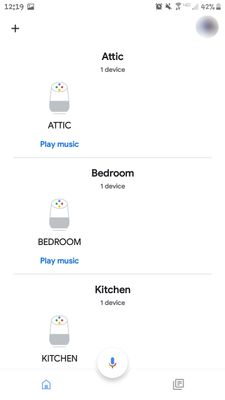
Sign In to vote
Labels
-
Account Linking
7 -
Android
9,148 -
Automation Help
4 -
Bug
18 -
Casting Issues
3 -
Chromecast (1st Gen)
2 -
Chromecast (2nd Gen)
2 -
Chromecast (3rd Gen)
1 -
Chromecast Audio
1 -
Chromecast with Google TV (4K)
6 -
Cloud Integration
4 -
Connectivity
2,596 -
Connectivity Issues
84 -
Developer Tools
3 -
Discussion
9 -
Display Issues
1,365 -
Feature Request
11 -
Features
4 -
Feedback
565 -
Getting Started
754 -
Google Assistant on Google Nest Device
2,067 -
Google Home (1st Gen)
2,009 -
Google Home app (Android)
1 -
Google Home Max
400 -
Google Home Mini (1st Gen)
1,475 -
Google Nest Device
4,230 -
Google Nest Wifi Pro
1 -
Google Wifi (Gen 1)
12 -
Home App
9 -
Home Automation ***
56 -
Home Away Assist
1 -
Internationalization
2 -
iOS
4,451 -
Issues casting from Chrome
3 -
Issues casting supported app
4 -
Local Integration
6 -
Login and Connection issues
5 -
Matter Integration
4 -
Nest App
2 -
Nest app (Android)
2 -
Nest Audio
1,434 -
Nest Aware
8 -
Nest Cam (battery)
1 -
Nest Cam Indoor
4 -
Nest Cam IQ
1 -
Nest Cam Outdoor
1 -
Nest Doorbell (battery)
1 -
Nest Doorbell (wired Gen 2)
1 -
Nest Hello
2 -
Nest Hub
2,163 -
Nest Hub (2nd Gen)
2,538 -
Nest Hub Max
1,765 -
Nest Mini
2,654 -
Nest Protect (Gen 1)
5 -
Nest Protect (Gen 2)
4 -
Nest Secure
1 -
Nest Wifi
106 -
Playing media to my speaker
2,944 -
Question
33 -
Smart Home
65 -
Speakers and Displays
12 -
Streaming Issues
6 -
User Experience
39 -
Wear OS
36 -
Web Browser
998
New solutions





